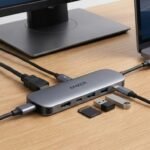
If your laptop doesn’t have enough ports, you’ve probably come across two common solutions: a USB-C hub and a docking station.
Although they can look similar, they are designed for somewhat different needs.
What Is a USB-C Hub?
A USB-C hub is usually a compact accessory that expands the number of ports available on a laptop.
Depending on the model, it may include:
- USB-A ports
- USB-C ports
- HDMI
- SD card slots
- Ethernet
Hubs are generally designed with portability in mind.
What Is a Docking Station?
A docking station is typically designed for a more permanent desk setup.
Depending on the model, it may provide a larger selection of connections, support multiple displays, and offer features intended for a full workstation.
Some docking stations can also reduce cable clutter by allowing multiple peripherals to connect through a single connection to the laptop.
Which One Should You Choose?
Choose a USB-C Hub If:
- You travel frequently
- You need a few extra ports
- You want something compact
- You primarily use a laptop on the go
Consider a Docking Station If:
- You have a dedicated desk
- You use several peripherals
- You need multiple display connections
- You want a more permanent workstation setup
What About Price?
USB-C hubs are generally available in a wide range of configurations, while docking stations can offer more extensive connectivity and features.
Instead of choosing based only on price, consider the ports and capabilities you actually need.
Final Takeaway
A USB-C hub and a docking station can both expand your laptop’s connectivity, but they serve different purposes.
A compact hub is convenient for everyday portability, while a docking station can be better suited to a more complete desktop setup.
The right choice depends on your laptop, peripherals, workspace, and how you plan to use the device.